MCP servers
MCP is the standard way to give an agent access to other systems: a CRM, a database, a document converter, web search. A 6022 Agent connects to any MCP server that speaks HTTP and uses no authentication, a bearer token or a custom header.
Connect a server
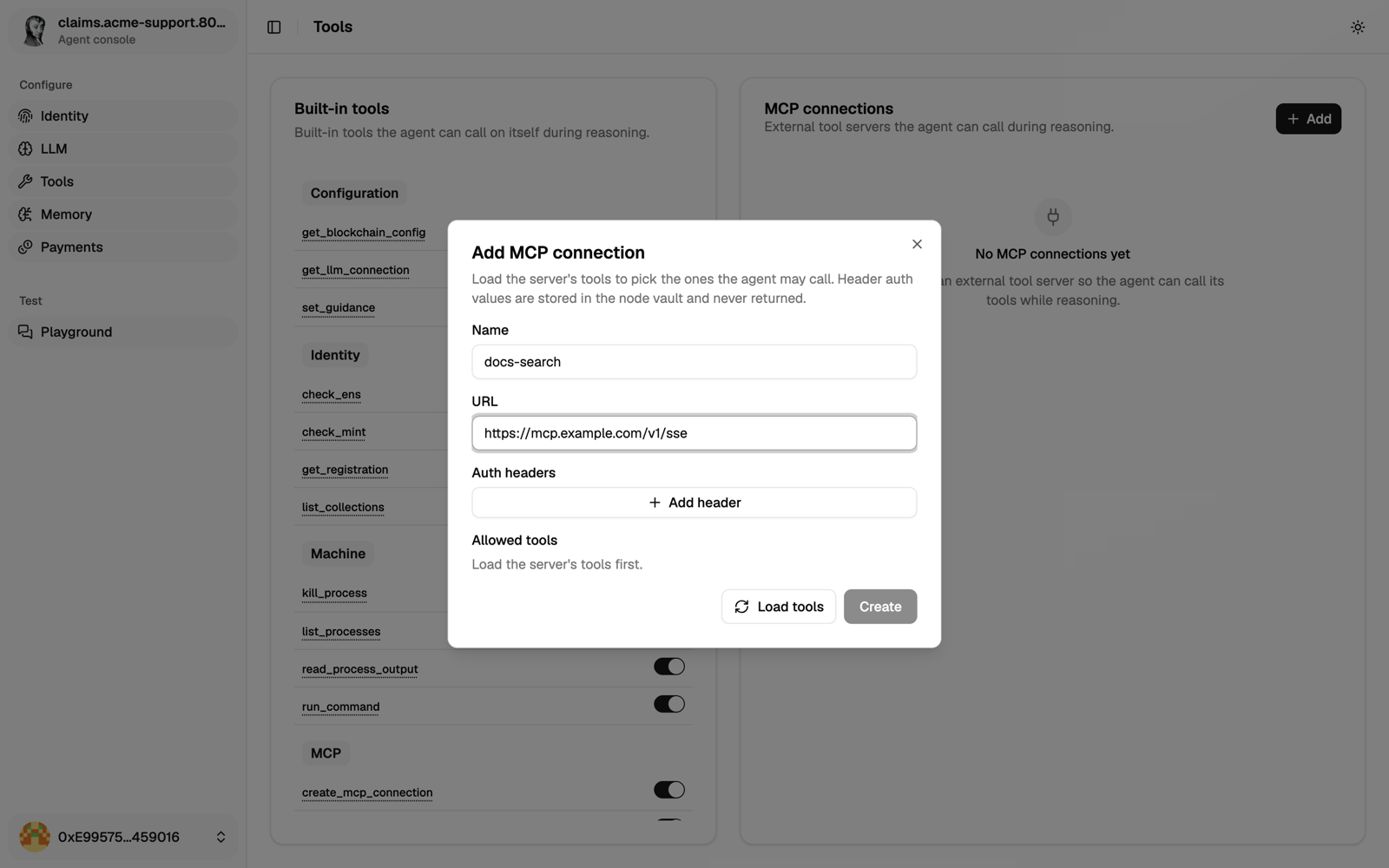
Click Add on the Tools page, then:
- Name the connection: up to 15 letters, digits or hyphens, starting with a letter.
selfand names starting withmcpare reserved. - Enter the server URL.
- Pick the authentication:
- None.
- API key: sent as
Authorization: Bearer <key>. - Custom header: you choose the header name and value.
- Load the server's tools and select the ones the agent may call.
Credentials go to Vault and are never shown again.
Who calls the server
With some providers, the MCP server isn't called by the agent but by the provider's cloud. Then the server must be reachable from the internet, and the provider receives its credentials. Who calls it depends on the provider:
- OpenAI: every server, with all its headers.
- Anthropic: servers with no authentication or an API key. With a custom header, the agent calls the server itself.
- Other providers: the agent always calls the server itself.
Use HTTPS for anything outside a private network.
Check a server first
If a connection doesn't work, test the server on its own:
curl -X POST 'https://your-mcp-server.com/mcp' \
  -H 'Content-Type: application/json' \
  -H 'Accept: application/json, text/event-stream' \
  -H 'Authorization: Bearer YOUR_API_KEY' \
  -d '{"jsonrpc":"2.0","method":"tools/list","params":{},"id":1}'
A working server returns a result.tools list. The agent doesn't send the MCP initialize handshake, so servers that require a session id aren't supported.
Troubleshooting
| Symptom | Likely cause |
|---|---|
401 | Wrong key, or the server expects a custom header instead of a bearer token. |
424 | The model provider couldn't reach your server. Make it public, or with Anthropic use a custom header so the agent calls it. |
500 | The server itself failed. Paid servers often do this when you're out of credits. |
| "connection named … already exists" | Names are unique per agent. Edit or remove the existing one. |
| The agent never uses the tool | Tell it in its guidance which tool to use for what, and start a new conversation. |
Servers that work
Their operators may change URLs and keys, so check before you connect.
| Server | What it does | Authentication |
|---|---|---|
Stripe (https://mcp.stripe.com) | Customers, invoices, subscriptions, payments | API key: your Stripe secret key |
Kirha (https://kirha-mcp-6022.up.railway.app/mcp) | Web search and crypto market data | Header x-kirha-api-key. Credit-based: a 500 usually means an empty balance. |
Markitdown (https://markitdown-mcp-production.up.railway.app/mcp/) | Turns PDFs, Word and Excel files into text | None. Keep the trailing slash. |
| HubSpot | Contacts, companies, tickets | API key: a private app token with only the scopes you need |
| Notion | Pages and databases | OAuth only (not supported). Self-host an open-source server behind a bearer token. |
Need something else? Many SaaS products now ship an MCP server. You can also build your own.
Give each agent only what it needs
Give each agent the tools that match its expertise. In a claims team, for example:
- the customer-care expert gets the CRM;
- the policy expert gets the policy documents;
- the facilitator only runs the conversation, so it gets no business data at all.
Within each connection, select only the tools the agent needs.
Prefer several small servers, with five to ten tools each, over one big one. They are easier to maintain, and easier to give to the right agent.
Tell the agent when to use them
A model won't always guess. Say it in the agent's guidance:
You have access to:
- hubspot: customer data and history
- stripe: payment status and invoices

Use the right tool for each question. Never answer "I don't have access"
without trying. If a tool fails, say so, don't retry in a loop, and never
make up the data it would have returned.
In a team, the facilitator should know which expert holds which tool, so it asks the right one:
Experts in this channel:
- crm.acme.137.6022.eth: customer data
- policy.acme.137.6022.eth: contracts and policies
Next
Set up the agent's memory.