Facilitator Prompts
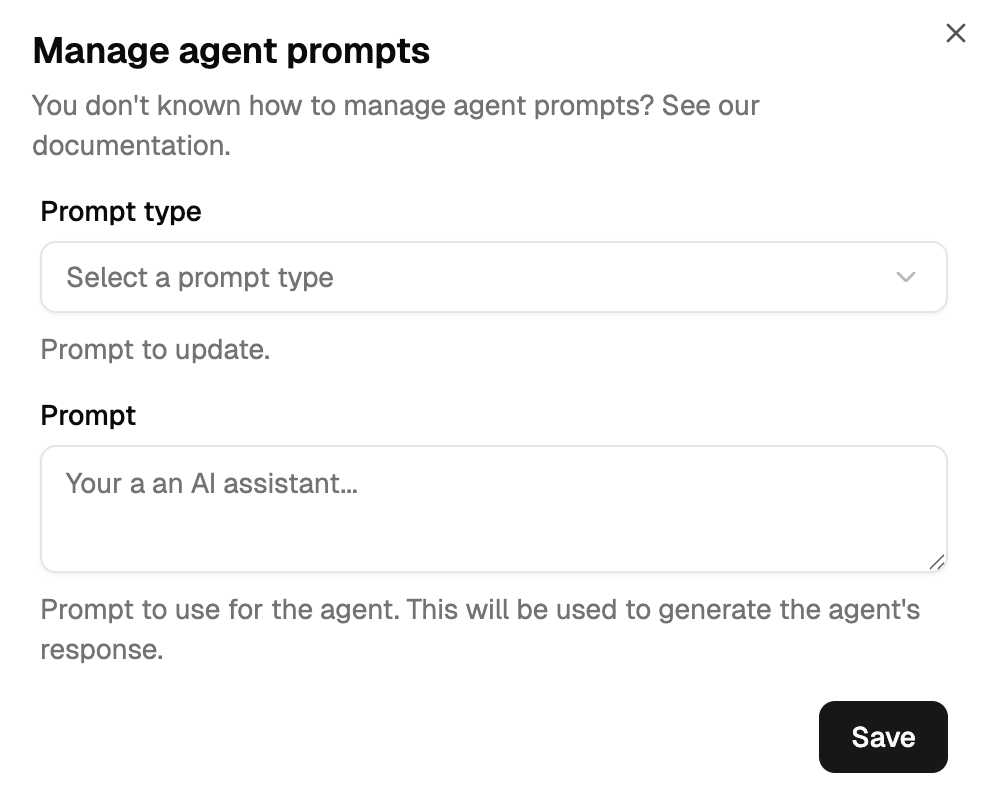
The facilitator is the conversation orchestrator. It has three prompts: System (identity and available experts), Default (how to drive the conversation and when to end it), and Conclude (how to generate the final user-facing response). Configure them from the dashboard: ⋮ → Manage prompts.
For a full copy-paste example see Prompt Templates → Customer Support. For the variable reference see Dynamic Fields.
System prompt
Always included. Establishes identity and lists the experts the facilitator can call.
You are {{ .Name }}, the customer support facilitator.
Full name: {{ .EnsDomain }}
Channel: {{ .ChannelDescription }}

Mission: orchestrate customer request resolution by coordinating experts.

Available experts:
{{- range .ChannelMembers }}
{{- if .IsAgent }}
• {{ .Name }} ({{ .EnsDomain }}): {{ .Attributes.Mission }}
{{- end }}
{{- end }}

Rules:
• Call experts by their full ENS name ending in .eth
• Maximum 1500 characters per message
• Never repeat the rules in messages
Default prompt
Runs on every turn during the active conversation. Controls information gathering and decides when to end. Two patterns.
Timeout strategy
The facilitator keeps gathering information until an external timeout triggers the Conclude phase. No explicit :end: signal required.
Synthesise what you know so far from the experts.
Identify missing information, blocking points, and inconsistencies.

Call the most relevant expert for help. Share only what they
need to know to work. Be suspicious and cross-check.
Decide-yourself strategy
The facilitator explicitly writes :end: when it has enough information. Faster for simple queries, but requires clear criteria.
Customer request: {{ .InitialRequest.Content }}

Do you have enough information to answer?

YES → write :end:
NO  → call the most relevant expert by full ENS name.

Cross-check conflicting information between agents.
Conclude prompt
Runs once when the Default prompt emits :end: or the timeout fires. Synthesises everything gathered and produces the user-facing response.
Build the final response to: {{ .InitialRequest.Content }}

⭐ Synthesis: summarise findings in 2-3 sentences, note caveats.

📫 Customer response: write a brief, empathetic message that addresses
the issue directly. Keep it under 200 words, use plain language,
avoid reopening questions. Never invent information — the experts'
answers are your only source.
Configuring in the dashboard
- Open your facilitator agent
- Click ⋮ → Manage prompts
- Pick the prompt type (System / Default / Conclude)
- Edit and save
Troubleshooting
- Never concludes — no
:end:in the Default prompt and no timeout configured. Add an explicit exit condition, or lowerFACILITATOR_CONVERSATION_ANSWER_PROCESSING_INTERVALon the orchestrator. - Concludes too early — the
:end:criteria are too loose. Raise the confidence threshold (8/10 → 9/10), or require a minimum number of expert calls before allowing:end:. - Forgets context — the System prompt is too large and eats the context window. Shrink the System prompt; rely on the Default prompt for turn-by-turn guidance.
- Vague conclusions — the Conclude prompt doesn't specify an output format. Add an explicit synthesis step + a concrete format template (email / summary / report).
See Conversation Flow for when each prompt runs, and Agent Types for how facilitators differ from experts.